| GINO Graphics Suite - GINOGRAF v9.5 |  |
 |
| GINO Graphics Suite - GINOGRAF v9.5 | |
|
Multi data set histogram component routines can be used to display stacked or clustered column charts representing a grid of data from a two dimensional data array. Any contiguous data block can be extracted where the first dimension represents the number of columns and the second dimension represents the number of data sets.
There are two components available for the drawing of a stacked or clustered histograms:
| ggBlockFillMultiHistogram() | Drawing block filled columns |
| ggFillMultiHistogram() | Drawing filled columns |
In both cases it is necessary to define both X and Y axis positions and data ranges before calling any of these routines using the axis definition routines. One of the axes should be defined as a discrete axis (scale=GDISCRETE) whereupon the heights are measured against the remaining non-discrete axis.
Users should note that the block filling routine fills the appropriate areas and follows this with drawing the column outline in the current GINO line colour.
The routine to display a block filled, multi-data set histogram is:
ggBlockFillMultiHistogram(type,rdata,ndim1,ncols,ndata,frac,gap, line,is1,is2)Where type can be GSTACKED or GCLUSTERED depending on the type of display required. The data array rdata should contain ndata sets each with ncols of data, with an optional offset from the start of the array set by is1,is2. The argument ndim1 represents the primary dimension of the two dimensional array.
The argument frac determines the width of the stacked/clustered column and gap determines the gap between each clustered column for type = GCLUSTERED.
The columns of each data set [i] are solid filled with the line style specified in line[i] with the extrusions filled with a darker (or lighter) shade of this line style according to the current block chart attributes (using ggSetBlockChartAttribs()).
The following shows an example of a block filled multi-data set histogram.
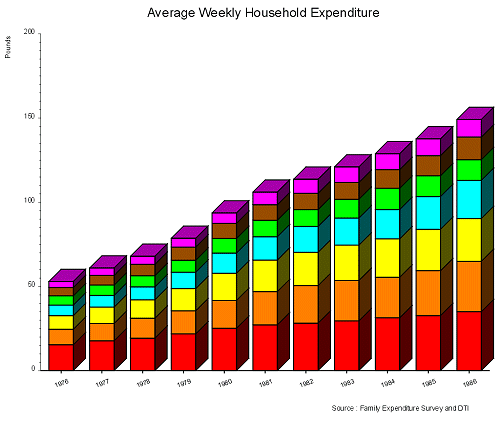 |
Block Filled Multi Histogram |
[C/C++]
#include <gino-c.h>
#include <graf-c.h>
#define NSET 7 /* Number of data sets */
#define NDATA 11 /* Number of data components */
#define MIN(x,y)%%((x) < (y) ? (x) : (y))
/* Date Data */
char  *dates[] = {"1976","1977","1978","1979","1980","1981",
                  "1982","1983","1984","1985","1986"};
/*  data to be plotted. */
float rdata[][NDATA] = {
{15.36,17.74,19.31,21.83,25.15,27.2, 28.19,29.56,31.43,32.7, 34.97},
{ 9.21,10.31,11.87,13.72,16.56,19.76,22.29,23.99,24.06,26.63,29.92},
{ 8.14, 9.71,10.9, 13.13,16.15,18.7, 19.79,20.96,22.77,24.56,25.43},
{ 6.19, 6.93, 7.66, 9.74,11.96,13.84,15.37,16.09,17.41,19.48,22.67},
{ 5.5,  6.11, 6.64, 7.14, 8.66, 9.8,  9.98,11.12,12.62,12.38,12.26},
{ 4.99, 5.78, 6.78, 7.79, 8.99, 9.23, 9.69,10.0, 11.1, 11.92,13.46},
{3.53, 4.38, 4.76, 5.25, 6.15, 7.46, 8.35, 9.22, 9.42, 9.95,10.43}};
/* Filling and line styles */
int fill[NSET] = {GSOLID,GSOLID,GSOLID,GSOLID,GSOLID,GSOLID,GSOLID};
int line[NSET]= {GRED,GORANGE,GYELLOW,GCYAN,GGREEN,GBROWN,GMAGENTA};
/* title */
char title1[] = "Average Weekly Household Expenditure";
GDIM paper;
int main ()
{
   int ipapty;
   float factor,cw,ch,xlen,ylen,xgap,ygap;
   float ffrac=0.9,gap=0.0;
   int coloff;
   float azim,elev,depth,top,side;
/* Enter GINO & initialise device. */
   gOpenGino();
/* Nominate the device */
  xxxxx();
/* Scale output to paper size. */
   gEnqDrawingLimits(&paper, &ipapty);
   factor = MIN(paper.xpap/1000.0, paper.ypap/750.0);
   gDefinePictureUnits(factor);
   gNewDrawing();
   gSetPointChars();
   gSetCharSizePoint(12);
   gSetCharFontName("Arial");
   ggSetGraphCharMode(GGINOMODE);
   ggRestoreAxesSettings();
   cw = 7.5;
   ch = 7.5;
   gSetCharSize(cw, ch);
/* Set up size of graph. */
   xlen = 1000.0*2.0/3.0;
   ylen = 750.0*2.0/3.0;
   xgap = xlen/4.0;
   ygap = ylen/4.0;
/* Position & scale the X-axis. */
   ggSetAxesPos(GAXISSTART, xgap, ygap, xlen, GXAXIS);
   ggSetAxesScaling(GDISCRETE, NDATA, 1.0, 11.0, GXAXIS);
/* Position & scale the Y-axis. */
   ggSetAxesPos(GAXISSTART, xgap, ygap, ylen, GYAXIS);
   ggSetAxesScaling(GLINEARTYPE3, 4, 0.0, 200.0, GYAXIS);
/* Plot data sets. */
   ggBlockFillMultiHistogram(GSTACKED,(float *)rdata,NDATA,
          NDATA,NSET,ffrac,gap,line,1,1);
/* Draw & title X-axis. */
   ggSetAxesAttribs(GOFFSET, ygap-2.0*ch, 1, -1, 0.0, 20.0,
      GDEFAULTPOSITION, GDEFAULTPOSITION, GNOREDUCE, GXAXIS);
   ggDrawAxes(GCARDINAL, GCLOCKWISE, GNOVAL, GXAXIS);
   ggDrawAxesLabels(NDATA, dates, GCLOCKWISE, GXAXIS);
/* Draw & title Y-axis. */
   ggDrawAxes(GINTERMEDIATE,GANTICLOCKWISE,GANTICLOCKWISE,GYAXIS);
   ggDrawAxesTitle("Pounds", xgap-6.0*cw, GYAXIS, GLEFT, GTOP);
/* Write title. */
   gSetCharSizePoint(18);
   ggDrawAxesTitle(title1, 650.0, GXAXIS, GBOTTOM, GCENTRE);

/* Credit. */
   gSetCharSizePoint(10);
   gMoveTo2D(600.0, 65.0);
   gDisplayStr("Source : Family Expenditure Survey and DTI");
/* Close down device & leave GINO. */
   gSuspendDevice();
   gCloseGino();
}
[F90]
use gino_f90
use graf_f90
parameter (NSET=7,NDATA=11)
! Date Data
character (len=4) ,dimension(NDATA) :: dates = (/ &
   '1976','1977','1978','1979','1980','1981', &
   '1982','1983','1984','1985','1986'/)
!  data to be plotted.
real,dimension(NDATA,NSET) :: data = reshape( (/ &
15.36,17.74,19.31,21.83,25.15,27.2, 28.19,29.56 31.43,32.7, 34.97, &
 9.21,10.31,11.87,13.72,16.56,19.76,22.29,23.99,24.06,26.63,29.92, &
 8.14, 9.71,10.9, 13.13,16.15,18.7, 19.79,20.96,22.77,24.56,25.43, &
 6.19, 6.93, 7.66, 9.74,11.96,13.84,15.37,16.09,17.41,19.48,22.67, &
 5.5,  6.11, 6.64, 7.14, 8.66, 9.8,  9.98,11.12,12.62,12.38,12.26, &
 4.99, 5.78, 6.78, 7.79, 8.99, 9.23, 9.69,10.0, 11.1, 11.92,13.46, &
 3.53, 4.38, 4.76, 5.25, 6.15, 7.46, 8.35, 9.22, 9.42, 9.95,10.43  &
 /) , (/NDATA,NSET/) )
! Filling and line styles
integer, dimension(NSET) :: fill = &
    (/GSOLID,GSOLID,GSOLID,GSOLID,GSOLID,GSOLID,GSOLID/)
integer, dimension(NSET) :: line = &
    (/GRED,GORANGE,GYELLOW,GCYAN,GGREEN,GBROWN,GMAGENTA/)
!
! title
!
character (len=41) :: title1 = &
     'Average Weekly Household Expenditure'
type (GDIM) paper
! Enter GINO & initialise device.
   call gOpenGino
   call xxxxx
!
! Scale output to paper size.
!
   call gEnqDrawingLimits(paper, ipapty)
   factor = MIN(paper%xpap/1000.0, paper%ypap/750.0)
   call gDefinePictureUnits(factor)
   call gNewDrawing
   call gSetPointChars()
           call gSetCharSizePoint(12)
   call gSetCharFontName('Arial')
   call ggSetGraphCharMode(GGINOMODE)
   call ggRestoreAxesSettings
   cw = 7.5
   ch = 7.5
   call gSetCharSize(cw, ch)
!
! Set up size of graph.
!
   xlen = 1000.0*2.0/3.0
   ylen = 750.0*2.0/3.0
   xgap = xlen/4.0
   ygap = ylen/4.0
!
! Position & scale the X-axis
!
   call ggSetAxesPos(GAXISSTART, xgap, ygap, xlen, GXAXIS)
   call ggSetAxesScaling(GDISCRETE, NDATA, 1.0, 11.0, GXAXIS)
!
! Position & scale the Y-axis
!
   call ggSetAxesPos(GAXISSTART, xgap, ygap, ylen, GYAXIS)
   call ggSetAxesScaling(GLINEARTYPE3, 4, 0.0, 200.0, GYAXIS)
!
! Plot data sets
!
   call ggBlockFillMultiHistogram(GSTACKED,data,NDATA, &
                                  NDATA,NSET,0.9,0.0,line,1,1)
!
! Draw & title X-axis.
!
   call ggSetAxesAttribs(GOFFSET, ygap-2.0*ch, 1, -1, 0.0, 20.0, &
      GDEFAULTPOSITION, GDEFAULTPOSITION, GNOREDUCE, GXAXIS)
   call ggDrawAxes(GCARDINAL, GCLOCKWISE, GNOVAL, GXAXIS)
   call ggDrawAxesLabels(NDATA, dates, GCLOCKWISE, GXAXIS)
!
! Draw & title Y-axis.
!
   call ggDrawAxes(GINTERMEDIATE,GANTICLOCKWISE,GANTICLOCKWISE, &
                   GYAXIS)
   call ggDrawAxesTitle('Pounds', xgap-6.0*cw, GYAXIS, GLEFT, GTOP)
!
! Write title.
!
   call gSetCharSizePoint(18)
   call ggDrawAxesTitle(title1, 650.0, GXAXIS, GBOTTOM, GCENTRE)
!
! Credit.
!
   call gSetCharSizePoint(10)
   call gMoveTo2D(600.0, 65.0)
   call gDisplayStr('Source : Family Expenditure Survey and DTI')
!
! Close down device & leave GINO.
!
   call gSuspendDevice()
   call gCloseGino()
   stop
   end
The routine to display a filled, multi-data set histogram is:
ggFillMultiHistogram(type,rdata,ndim1,ncols,ndata,frac,gap,fill,line,is1,is2)Where type can be GSTACKED or GCLUSTERED depending on the type of display required. The data array rdata should contain ndata sets each with ncols of data, with an optional offset from the start of the array set by is1,is2. The argument ndim1 represents the primary dimension of the two dimensional array.
The argument frac determines the width of the stacked/clustered column and gap determines the gap between each clustered column for type = GCLUSTERED.
The columns of each data set [i] are filled with fill style fill[i] and line style line[i]. Various hatches and cross hatches as well as solid fill are available. If an element of fill contains a number less than -1(GHOLLOW), the corresponding column is not filled and the boundary not drawn. The line styles used to fill the columns are held in the array line. The default line styles, hatch styles and fill styles appear in Appendix A of this manual (see Defaults). Further information on line style definition (which includes colour definition) and information on hatch and fill style definition appears in the main introduction.
N.B. Note that the outline of the columns drawn by ggFillMultiHistogram() DO NOT match those drawn by ggBlockFillMultiHistogram() due to the extra width required by the extrusions in the latter routine.
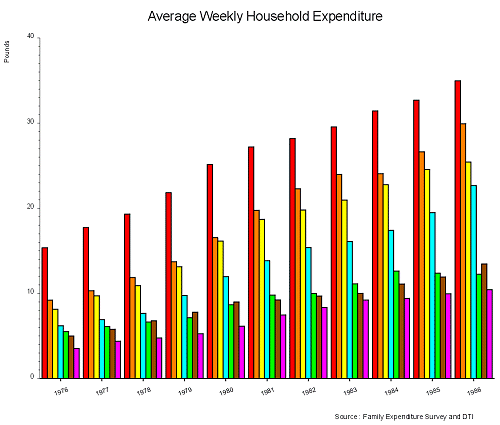 |
Filled Multi Histogram |
The above chart can be displayed with similar code to the block filled example shown above with the following changes:
[C/C++]
/* Position & scale the Y-axis. */
   ggSetAxesPos(GAXISSTART, xgap, ygap, ylen, GYAXIS);
   ggSetAxesScaling(GLINEARTYPE3, 4, 0.0, 40.0, GYAXIS);
/* Plot data sets. */
   ggFillMultiHistogram(GCLUSTERED,(float *)rdata,NDATA,
              NDATA,NSET,ffrac,gap,fill,line,1,1);
[F90]
!
! Position & scale the Y-axis.
!
   call ggSetAxesPos(GAXISSTART, xgap, ygap, ylen, GYAXIS)
   call ggSetAxesScaling(GLINEARTYPE3, 4, 0.0, 40.0, GYAXIS)
!
! Plot data sets.
!
   call ggFillMultiHistogram(GCLUSTERED,data,NDATA, &
              NDATA,NSET,0.9,0.0,fill,line,1,1)